"darpan.space" Latest Ethical Hacking And Penetration Testing Tools Use And How To Download On Kali , Mac , Android & Windows.

Hacking Tool Malwarebytes

The Rising Threat of Cyber Hacking and Malware Attacks



​Almost everyone has a computer or some sort of smart device these days. And with that comes the need to protect your device from malware. Malwarebytes is a program that can help you do just that.

Malware is a type of software that is designed to damage or disable computers and other devices. It can sneak onto your device without you even knowing it and start wreaking havoc. Malware can delete files, steal information, or even give someone else control of your device.

That’s why it’s important to have a program like Malwarebytes installed on your device. Malwarebytes can detect and remove malware that other security programs miss. It’s constantly updated with the latest malware definitions, so it can keep up with the latest threats.

And best of all, Malwarebytes is free. So there’s no excuse not to have it protecting your device.

So what are you waiting for? Get Malwarebytes installed on your device today and start protecting yourself from malware.

What is Cyber Hacking?

​In today’s world, cybercrime is one of the biggest threats to businesses and individuals alike. With the ever-growing reliance on technology, hacking has become a major issue. But what exactly is cyber hacking?

Cyber hacking is the unauthorized access or manipulation of computer systems and data. Hackers can gain access to systems through a variety of means, including exploiting vulnerabilities in software or hardware, brute force attacks, or social engineering. Once they have access, they can then use that access to steal data, plant malware, or carry out other malicious activities.

One of the most common types of cyber hacking is known as phishing. This is where hackers send fake emails or create fake websites that look legitimate in order to trick people into revealing personal information such as passwords or credit card details. Phishing attacks are becoming increasingly sophisticated, and it’s becoming harder for people to spot the difference between a real website and a fake one.

Another common type of cyber hacking is ransomware. This is where hackers encrypt important files on a victim’s computer and demand a ransom in order to decrypt them. Ransomware attacks can be devastating, and often result in the loss of important data.

Cyber hacking is a serious problem, and it’s only going to become more of a problem as our reliance on technology grows. It’s important to be aware of the dangers of cyber hacking and to take steps to protect yourself from it. Here are some tips:

- Use strong passwords and don’t reuse them across different accounts.

- Use a password manager to help you keep track of your passwords.

- Keep your software up to date, and install security patches as soon as they’re released.

- Be careful about what you click on and download, especially if you’re not sure of the source.

- Use a reputable antivirus program and scan your computer regularly for malware.

- Backup your important data regularly, so you can recover it if it’s lost or corrupted.

By following these tips, you can help to protect yourself from cyber hacking.

What is Malware?

​Cyber attacks are becoming more and more common, and the potential consequences are becoming more and more severe. Here are just a few potential consequences of a cyber attack:

1. Identity theft. One of the most common consequences of a cyber attack is identity theft. Hackers can access your personal information and use it to steal your identity. This can lead to financial losses and a lot of inconvenience.

2. loss of confidential data. Another common consequence of a cyber attack is the loss of confidential data. This includes things like customer lists, employee records, financial records, etc. This data can be very valuable to hackers, and if it falls into the wrong hands, it can be used for nefarious purposes.

3. disruption of service. Another potential consequence of a cyber attack is the disruption of service. If a hacker takes down a website or server, it can cause major disruptions for businesses and individuals. This can lead to lost revenue, lost customers, and a lot of inconvenience.

4. damage to reputation. A cyber attack can also damage a company's or individual's reputation. If sensitive data is leaked or a website is taken down, it can reflect badly on the company or individual. This can lead to lost business and customers.

5. legal liabilities. A company or individual that is the victim of a cyber attack may also face legal liabilities. If sensitive data is leaked, it may be considered a data breach. If a website is taken down, it may be considered an act of vandalism. These are just a few potential consequences of a cyber attack. Cyber attacks can have a serious impact on businesses and individuals, and it is important to be aware of the potential consequences.

Common Types of Cyber Crimes

​Cybercrime is defined as a crime in which a computer is the object of the crime or is used as a tool to commit an offense. Cybercrimes can be classified into three different categories:

1.Crimes against people
2.Crimes against property
3.Crimes against governments

1. Crimes against people:

a. Identity theft: Identity theft is when someone uses your personal information, such as your name, Social Security number, credit card number, or bank account information, without your permission, to commit fraud or other crimes.

b. Phishing: Phishing is a type of online identity theft that occurs when someone sends an email that looks like it’s from a legitimate source, such as a bank or credit card company. The email usually contains a link that takes you to a fake website that looks real. The fake website then asks you to enter personal information, such as your credit card number, Social Security number, or bank account information.

c. Malware: Malware is a type of software that is designed to damage your computer or mobile device, or to steal your personal information. Malware can be installed on your device without your knowledge, often through email attachments or by visiting malicious websites.

d. Denial-of-service attack (DoS attack): A DoS attack is a type of cyber attack that is designed to make a computer or network resource unavailable to users. A DoS attack can be carried out using a variety of methods, such as flooding a server with requests so that it can no longer respond to legitimate requests, or by vandalizing a website so that it can no longer be accessed.

2. Crimes against property:

a. Copyright infringement: Copyright infringement is the unauthorized use of copyrighted material, such as music, movies, or software. Copyright infringement is a crime that is punishable by law.

b. Hacking: Hacking is the unauthorized access to or misuse of computer systems, networks, or data. Hacking can be done for a variety of reasons, such as to steal personal information or to cause damage to a system.

3. Crimes against governments:

a. Espionage: Espionage is the unauthorized gathering of intelligence about another country or government. Espionage is a crime that is punishable by law.

b. Cyberterrorism: Cyberterrorism is the use of computers and the Internet to carry out terrorist activities. Cyberterrorism can include activities such as Denial-of-service attacks, virus attacks, and website defacements. Cyberterrorism is a crime that is punishable by law.


Read More

Night Vision Patrolling Robot using Raspberry PI

Night Vision Patrolling Robot With Sound Sensing using Raspberry PI :-

Raspberry Pi 4 Model B - Side.jpg

ABSTRACT

This paper we propose a security patrolling robot that uses night vision camera for securing any premises. The robotic vehicle moves at particular intervals and is equipped with night vision camera and sound sensors. It uses a predefined line to follow its path while patrolling. It stops at particular points and moves to next points if sound is detected. The system uses IR based path following system for patrolling assigned area. It monitors each area to detect any intrusion using 360degree rotating HD camera. It has the ability to monitor sound in the premises. Any sound after company is closed and it starts moving towards the sound on its predefined path. It then scans the area using its camera to detect any human faces detected. It captures and starts transmitting the images of the situation immediately on sound or human face detection. Here we use IOT Local Area Network (LAN) for receiving transmitted images and displaying them to user with alert sounds. Thus we put forward a fully autonomous security robot that operates tirelessly and patrols large areas on its own to secure the facility.

INTRODUCTION

The idea behind this is to secure the whole area. Any small sound results in the alert and robot automatically goes to the particular area and capture the image of that area and send it to the user. Raspberry Pi connected with the camera plays an important role in making an automatic robotic system.

EXISTING SYSTEM

In the existing system, robot has to control remotely where the person has to monitor the area using remote but manually controlling and the more Human more is required to implement this system.

PROPOSED METHOD

In this proposed system, Raspberry pi is installed with the night vision camera which help the system to go for the automation and help to find the human or any problem detected using the sound sensor and according to the sound produced it automatically goes to that area and capture the image and send it to user using IOT technology.

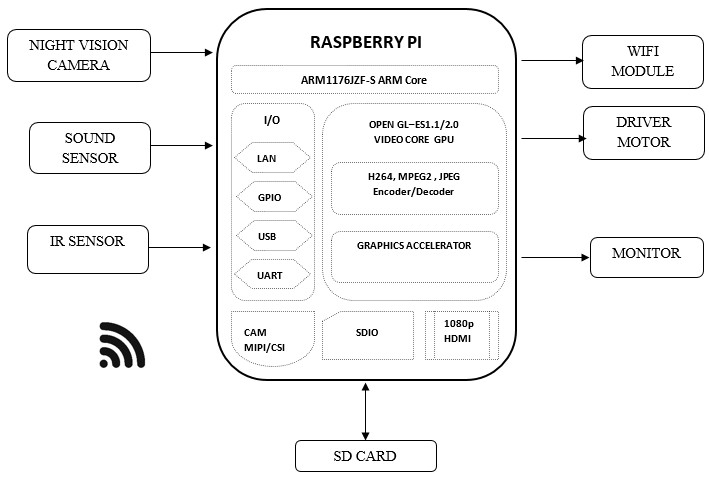
BLOCK DIAGRAM

night_vision_patrolling_robot_with_sound_sensing

MONITORING SECTION

night_vision_patrolling_robot_with_sound_sensing2

BLOCK DIAGRAM DESCRIPTION

  • In this project IR Sensor is used to make the robot move automatically following a specific path. 
  • Sound sensor is used to know the sound in the particular area.
  • IOT is used to send the capture image to the person.
  • Connect USB camera with raspberry pi
  • Connect power supply for Raspberry pi
  • Plug the HDMI cable in Raspberry pi from the monitor using VGA to HDMI converter cable
  • Connect USB Mouse and USB keyboard to the Raspberry pi

HARDWARE REQUIREMENTS

  • Raspberry Pi
  • Night Vision Camera
  • IR Sensor
  • Sound Sensor
  • DC Motor ( Robot module)
  • SD card
  • Monitor

SOFTWARE REQUIREMENTS

  • Raspbian Jessie
  • Language – Linux 
  • Python

CONCLUSION

According to this system, whole area surveillance is done using the night vision camera and also automatic system when the sound is detected robot will follow the particular path and go to that area and capture the area and send using IOT. This system is an automatic smart way for night vision patrolling.

REFERENCES

[1] “Review of human detection techniques in night vision” in 2017 International Conference on Wireless Communications, Signal Processing and Networking (WiSPNET)

[2] Eun Som Jeon et al., “Human detection based on the generation of a background image by using a far-infrared light camera”, Sensors, vol. 15, no. 3, pp. 6763-6788, 2015.

[3] Dushyant Kumar Singh, Dharmender Singh Kushwaha, “automatic intruder combat system: a way to smart border surveillance”, Defence Science Journal, vol. 67, no. 1, pp. 50-58, 2016.


Read More

USBKiller

 What Is The USB Killer ?


The USBKill is a device that stress tests hardware. When plugged in power is taken from a USB-Port, multiplied, and discharged into the data-lines, typically disabling an unprotected device.


Also USB killer Is Doing Many Things Like With USB Killer You Compromise Any System Which Have A USB Supported Port.


Used by penetration testers, hardware manufacturers, law-enforcement and industrial clients world-wide, the USBKill has been adopted the industry standard for USB Stress-testing.


How USB Killer Is Works ?


Essentially, a USB Killer works by delivering 210-220 volts to an interface that is designed for 5 volts. The overpowered-surge can damage or destroy not only ports, but also attached hardware. The concept behind USB Killer is similar to that of Ethernet Killer, a modified power cord that does much the same thing.


What is a USB Killer ? Why They Use It?


How You Can Buy USB killer?

USB Killer is sold commercially under the name USB Kill. The original concept behind the device was allegedly to help hardware manufacturers and network administrators determine how well a digital device could withstand power surges and electrostatic discharge (ESD). Since its invention, however, this type of altered thumb drive has not been used for penetration testing by any major company -- it has proved popular with cybercriminals, however. 


link:- USBKill | USB Kill devices for pentesting & law-enforcementhttps://usbkill.com


How to Made USB Killer At Home?


Which new Tool You Want Please Share Me On Comment 😁


Read More

PyPhisher - Ultimate Hacking tool

Ultimate phishing tool in python. Includes popular websites like facebook, twitter, instagram, github, reddit, gmail and many others.

How to hack any social media account? | by Yashwant Singh 🐧 | Nov, 2022 |  System Weakness

[*]Announcent

This project is now a part of MaxPhisher. Further bug fixes and feature addition will be available in that

[+] Installation

Install dependencies (git, python, php ssh)
  • For Debian (Ubuntu, Kali-Linux, Parrot)
    • sudo apt install git python3 php openssh-client -y
  • For Arch (Manjaro)
    • sudo pacman -S git python3 php openssh --noconfirm
  • For Redhat(Fedora)
    • sudo dnf install git python3 php openssh -y
  • For Termux
    • pkg install git python3 php openssh -y
Clone this repository
  • git clone https://github.com/KasRoudra/PyPhisher
Enter the directory
  • cd PyPhisher
Install all modules
  • pip3 install -r files/requirements.txt
Run the tool
  • python3 pyphisher.py

Or, directly run

wget https://raw.githubusercontent.com/KasRoudra/PyPhisher/main/pyphisher.py && python3 pyphisher.py

Pip

  • pip3 install pyphisher [For Termux]
  • sudo pip3 install pyphisher [For Linux]
  • pyphisher

Docker

  • sudo docker pull kasroudra/pyphisher
  • sudo docker run --rm -it kasroudra/pyphisher

Support

OSSupport Level
LinuxExcellent
AndroidExcellent
iPhoneAlpha (Recommended docker)
MacOSAlpha (Recommended docker)
WindowsUnsupported (Use docker/virtual-box/vmware)
BSDNever tested

Options

usage: pyphisher.py [-h] [-p PORT] [-o OPTION] [-t TUNNELER]
                    [-r REGION] [-s SUBDOMAIN] [-u URL] [-m MODE]
                    [-e TROUBLESHOOT] [--nokey] [--noupdate]

options:
  -h, --help            show this help message and exit
  -p PORT, --port PORT  PyPhisher's server port [Default : 8080]
  -o OPTION, --option OPTION
                        PyPhisher's template index [Default : null]
  -t TUNNELER, --tunneler TUNNELER
                        Tunneler to be chosen while url shortening
                        [Default : Cloudflared]
  -r REGION, --region REGION
                        Region for ngrok and loclx [Default: auto]
  -s SUBDOMAIN, --subdomain SUBDOMAIN
                        Subdomain for ngrok and loclx [Pro Account]
                        (Default: null)
  -u URL, --url URL     Redirection url after data capture [Default :
                        null]
  -m MODE, --mode MODE  Mode of PyPhisher [Default: normal]
  -e TROUBLESHOOT, --troubleshoot TROUBLESHOOT
                        Troubleshoot a tunneler [Default: null]
  --nokey               Use localtunnel without ssh key [Default:
                        False]
  --noupdate            Skip update checking [Default : False]

Features:

  • Multi platform (Supports most linux)
  • Easy to use
  • Possible error diagnoser
  • 77 Website templates
  • Concurrent 4 tunneling (Ngrok, Cloudflared, Loclx and LocalHostRun)
  • Upto 8 links for phishing
  • OTP Support
  • Argument support
  • Credentials mailing
  • Built-in masking of URL
  • Custom masking of URL
  • URL Shadowing
  • Redirection URL settings
  • Portable file (Can be run from any directory)
  • Get IP Address and many other details along with login credentials

Relevant Tools by Me

Requirements

  • Python(3)
    • requests
    • bs4
    • rich
  • PHP
  • SSH
  • 900MB storage

If not found, php and python modoules will be installed on first run

Tested on

  • Termux
  • Ubuntu
  • Kali-Linux
  • Arch
  • Fedora
  • Manjaro

Usage

  1. Run the script
  2. Choose a Website
  3. Wait sometimes for setting up all
  4. Send the generated link to victim
  5. Wait for victim login. As soon as he/she logs in, credentials will be captured

Example

PyPhisher

Video Tutorial

PyPhisher in Termux 
PyPhisher in Kali Linux by InfoSecPat 
PyPhisher in Kali Linux by Sathvik

Whats new in 1.8?

  • Mailing
    • Now you can send credentials to any email. You just need a gmail and app password to use this feature. Edit the data in files/email.json
  • Custom Preview
    • Now you can set a custom social media preview of your link. Enter a website url when asked in shadow url. Your link will have same appearence as that website in whatsapp/messenger/telegram etc. Note this only works with Cloudflared urls
  • OTP Support
    • 20 templates will show an option to enable otp pages
  • Saved
    • An option to view all saved credentials just from PyPhisher. This credentials won't get deleted in PyPhisher update

Whats new in 1.9?

  • Loclx
    • Introducing a new port forwarding/tunneling service named localxpose or loclx. It is quite slower but still usable
  • Docker image
    • A docker image is published which can be pulled and run
  • PIP
    • This project is now also available in PIP

Whats new in 2.0?

  • LocalHostRun
    • Introducing a new port forwarding/tunneling service named localhost.run. It works over ssh without binaries
  • Redirection url
    • Users can decide where the victim will be redirected after data is captured

Solution of common issues

  • Some secured browsers like Firefox can warn for '@' prefixed links. You should use pure links or custom link to avoid it.
  • VPN or proxy prevents tunneling and even proper internet access. Turn them off you have issues.
  • Some android requires hotspot to start Ngrok or Cloudflared. If you face 'tunneling failed' in android, most probably your hotspot is turned off. Turn it on and keep it on untill you close PyPhisher.
  • If you want mailing credentials then you need to use app password. Visit here and generate an app password, put that in files/email.json. You may need to enable 2FA before it.

[!] Disclaimer

This tool is developed for educational purposes. Here it demonstrates how phishing works. If anybody wants to gain unauthorized access to someones social media, he/she may try out this at his/her own risk. You have your own responsibilities and you are liable to any damage or violation of laws by this tool. The author is not responsible for any misuse of PyPhisher!

This repository is open source to help others. So if you wish to copy, consider giving credit!

Credits:

Some base codes and templates are from htr-tech, otp templates are from ignitech and url masking is inspired from jaykali

Want to show support? Just spread the word and smash the star button


Read More